Interacting with Zeek using WebSockets
Introduction
Usually, Zeek produces protocol logs consumed by external applications. These external applications might be SIEMs, real-time streaming analysis platforms or basic archival processes compressing logs for long term storage.
Certain use-cases require interacting and influencing Zeek’s runtime behavior
outside of static configuration via local.zeek.
The classic Input Framework and Configuration Framework can be leveraged for runtime configuration of Zeek as well as triggering arbitrary events or script execution via option handlers. These frameworks are mostly file- or process-based and may feel a bit unusual in environments where creation of files is uncommon or even impossible due to separation of concerns. In many of today’s environments, interacting using HTTP-based APIs or other remote interfaces is more common.
Note
As an aside, if you need more flexibility than the WebSocket API offers today, an alternative could be to use JavaScript within Zeek. This opens the possibility to run a separate HTTP or a totally different Node.js based server within a Zeek process for quick experimentation and evaluation of other approaches.
Background and Setup
Since Zeek 5.0, Zeek allows connections from external clients over WebSocket. This allows these clients to interact with Zeek’s publish-subscribe layer and exchange Zeek events with other Zeek nodes. Initially, this implementation resided in the Broker subsystem. With Zeek 8.0, most of the implementation has been moved into core Zeek itself with the v1 serialization format remaining in Broker.
WebSocket clients may subscribe to a fixed set of topics and will receive Zeek events matching these topics that Zeek cluster nodes, but also other WebSocket clients, publish.
With Zeek 8.0, Zeekctl has received support to interact with Zeek cluster nodes
using the WebSocket protocol. If you’re running a Zeekctl based cluster and
want to experiment with WebSocket functionality, add UseWebSocket = 1 to
your zeekctl.cfg:
# zeekctl.cfg
...
UseWebSocket = 1
This will essentially add the following snippet, enabling a WebSocket server on the Zeek manager:
event zeek_init()
     {
     if ( Cluster::local_node_type() == Cluster::MANAGER )
         {
         Cluster::listen_websocket([
             $listen_addr=127.0.0.1,
             $listen_port=27759/tcp,
         ]);
         }
     }
To verify that the WebSocket API is functional in your deployment use, for example, websocat as a quick check.
$ echo '[]' | websocat ws://127.0.0.1:27759/v1/messages/json
{"type":"ack","endpoint":"3eece35d-9f94-568d-861c-6a16c433e090-websocket-2","version":"8.0.0-dev.684"}
Zeek’s cluster.log file will also have an entry for the WebSocket client connection.
The empty array in the command specifies the client’s subscriptions, in this case none.
Version 1
The currently implemented protocol is accessible at /v1/messages/json.
The data representation
is documented in detail within the Broker project. Note that this format is a
direct translation of Broker’s binary format into JSON, resulting in a fairly
tight coupling between WebSocket clients and the corresponding Zeek scripts.
Most prominently is the representation of record values as vectors instead
of objects, making the protocol sensitive against reordering or introduction
of optional fields to records.
Note
We’re looking into an iteration of the format. If you have feedback or would like to contribute, please reach out on the usual community channels.
Handshake and Acknowledgement
The first message after a WebSocket connection has been established originates from the client. This message is a JSON array of strings that represent the topics the WebSocket client wishes to subscribe to.
Zeek replies with an acknowledgement message that’s a JSON object or an error.
Events
After the acknowledgement, WebSocket clients receive all events arriving on topics they have subscribed to.
$ websocat ws://127.0.0.1:27759/v1/messages/json
["zeek.test"]
{"type":"ack","endpoint":"d955d990-ad8a-5ed4-8bc5-bee252d4a2e6-websocket-0","version":"8.0.0-dev.684"}
{"type":"data-message","topic":"zeek.test","@data-type":"vector","data":[{"@data-type":"count","data":1},{"@data-type":"count","data":1},{"@data-type":"vector","data":[{"@data-type":"string","data":"hello"},{"@data-type":"vector","data":[{"@data-type":"count","data":3}]},{"@data-type":"vector","data":[]}]}]}
The received messages, again, are encoded in Broker’s JSON format. Above data-message
represents an event received on topic zeek.test. The event’s name is hello.
This event has a single argument of type count. In the example above
its value is 3.
To send events, WebSocket clients similarly encode their event representation to Broker’s JSON format and send them as text data frames.
X-Application-Name Header
When a WebSocket client includes an X-Application-Name HTTP header in
the initial WebSocket Handshake’s GET request, that header’s value is available
in the Cluster::websocket_client_added event’s endpoint argument (see Cluster::EndpointInfo).
The header’s value will also be included in cluster.log messages.
Additionally, if the cluster telemetry for WebSocket clients is set to
Cluster::Telemetry::VERBOSE or Cluster::Telemetry::DEBUG
via Cluster::Telemetry::websocket_metrics, the header’s value is
included as app label in metrics exposed by the Telemetry Framework.
As of Zeek 8.0, a WebSocket client will be rejected if the header is set, but
its value doesn’t match [-/_.=:*@a-zA-Z0-9]+.
Language Bindings
Note that it’s possible to use any language that offers WebSocket bindings. The ones listed below mostly add a bit of convenience features around the initial Handshake message, error handling and serializing Zeek events and values into the Broker-specific serialization format.
For example, using the Node.js builtin WebSocket functionality,
the websocat example from above can be reproduced as follows:
// client.js
const socket = new WebSocket('ws://192.168.122.107:27759/v1/messages/json');

socket.addEventListener('open', event => {
  socket.send('["zeek.test"]');
});

socket.addEventListener('message', event => {
  console.log('Message from server: ', event.data);
});
$ node ./client.js
Message from server:  {"type":"ack","endpoint":"2e951b0c-3ca4-504c-ae8a-5d3750fec588-websocket-10","version":"8.0.0-dev.684"}
Message from server:  {"type":"data-message","topic":"zeek.test","@data-type":"vector","data":[{"@data-type":"count","data":1},{"@data-type":"count","data":1},{"@data-type":"vector","data":[{"@data-type":"string","data":"hello"},{"@data-type":"vector","data":[{"@data-type":"count","data":374}]},{"@data-type":"vector","data":[]}]}]}
Golang
Zeek Broker websocket interface library for Golang (not an official Zeek project)
Rust
Rust types for interacting with Zeek over WebSocket (not an official Zeek project)
Python
There are no ready to use Python libraries available, but the third-party
websockets package
allows to get started quickly.
You may take inspiration from zeek-client’s implementation
or the small helper library used by various of Zeek’s own tests for the
WebSocket API.
Zeekctl similarly ships a light implementation
using the websockets library to implement its netstats and print commands.
Outgoing Connections
For some deployment scenarios, Zeek only offering a WebSocket server can be cumbersome. Concretely, when multiple independent Zeek clusters interact with a single instance of a remote API. For instance, this could be needed for configuring a central firewall. In such scenarios, it is more natural for Zeek to connect out to the remote API, rather than the remote API connecting to the Zeek cluster.
For these use-cases, the current suggestion is to run a WebSocket bridge between a Zeek cluster and the remote API. One concrete tool that can be used for this purpose is websocat.
Note
This topic has previously been discussed elsewhere. The following GitHub issue and discussion provide more background and details.
Example Architecture
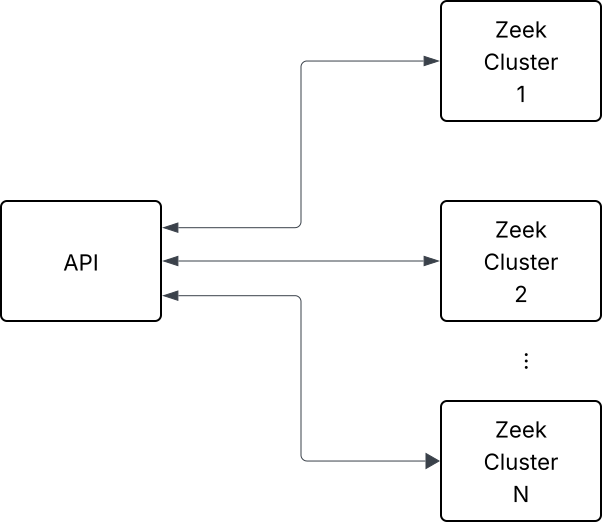
Multiple Zeek instances and a single remote API
The following proposal decouples the components using a WebSocket bridge for every Zeek cluster. This ensures that the depicted remote API does not need knowledge about an arbitrary number of Zeek clusters.
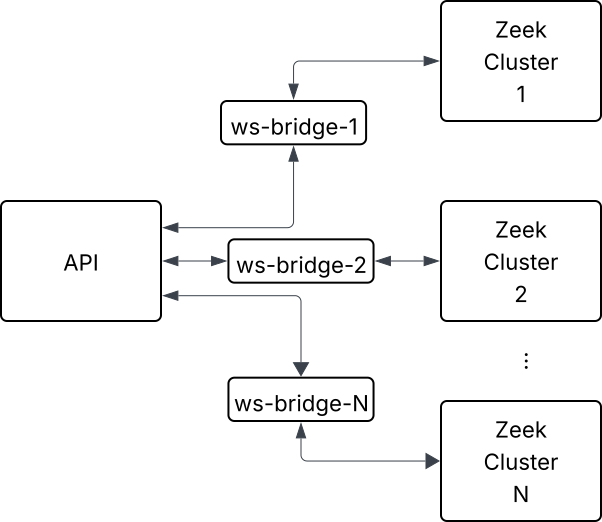
Multiple Zeek instances and a single remote API with WebSocket bridges.
Example Implementation
Assuming the depicted remote API provides a WebSocket server as well,
it is possible to use websocat as the bridge directly.
The crux for the remote API is that upon a new WebSocket client connection,
the first message is the topic array that the remote API wishes to subscribe
to on a Zeek cluster.
Putting these pieces together, the following JavaScript script presents the
remote API, implemented using the ws library.
It accepts WebSocket clients on port 8080 and sends the topic array as the first message
containing just zeek.bridge.test. Thereafter, it simply echos all incoming
WebSocket messages.
// server.js
import WebSocket, { WebSocketServer } from 'ws';

const wss = new WebSocketServer({ port: 8080 });

wss.on('connection', (ws, req) => {
  ws.on('error', console.error);
  ws.on('close', () => { console.log('%s: gone', ws.zeek.app); });

  ws.on('message', function message(data) {
      console.log('%s: received: %s', ws.zeek.app, data);
  });

  let topics = ['zeek.bridge.test'];
  let app = req.headers['x-application-name'] || '<unknown application>'
  ws.zeek = {
    app: app,
    topics: topics,
  };

  console.log(`${app}: connected, sending topics array ${JSON.stringify(topics)}`);
  ws.send(JSON.stringify(topics));
});
The Zeek side starts a WebSocket server on port 8000 and regularly publishes
a hello event to the zeek.bridge.test topic.
global hello: event(c : count);

global c = 0;

event tick()
	{
	Cluster::publish("zeek.bridge.test", hello, ++c);
	schedule 1.0sec { tick() };
	}

event zeek_init()
	{
	Cluster::listen_websocket([$listen_addr=127.0.0.1, $listen_port=8000/tcp]);
	event tick();
	}
These two servers can now be connected by running websocat as follows:
# In terminal 1 (use node if your Zeek has no JavaScript support)
$ zeek server.js

# In terminal 2
$ zeek server.zeek

# In terminal 3
$ while true; do websocat --text -H='X-Application-Name: client1' ws://localhost:8000/v1/messages/json ws://localhost:8080 || sleep 0.1 ; done
The first few lines of output in terminal 1 should then look as follows:
# zeek server.js
client1: connected, sending topics array ["zeek.bridge.test"]
client1: received: {"type":"ack","endpoint":"9089e06b-8d33-5585-ad79-4f7f6348754e-websocket-135","version":"8.1.0-dev.91"}
client1: received: {"type":"data-message","topic":"zeek.bridge.test","@data-type":"vector","data":[{"@data-type":"count","data":1},{"@data-type":"count","data":1},{"@data-type":"vector","data":[{"@data-type":"string","data":"hello"},{"@data-type":"vector","data":[{"@data-type":"count","data":1792}]},{"@data-type":"vector","data":[]}]}]}
...
If you require synchronization between the Zeek instance and the remote API, this is best achieved with events once the connection between the remote API and the Zeek cluster is established.
Alternative Approaches
Since v21, Node.js contains a built-in WebSocket client, making it possible to use vanilla JavaScript within Zeek to establish outgoing WebSocket connections, too.
The websocat tool provides more flexibility, potentially allowing
to forward WebSocket messages to external commands which in turn could
use HTTP POST requests to an external API.